Accede a Getcaller desde cualquier navegador sin descargar una aplicación. Busca números de teléfono, consulta informes de spam y gestiona tu perfil de identificador de llamadas en línea en web.getcaller.net.
Abrir Versión WebBusca números de teléfono directamente desde tu navegador web. No necesitas instalar ninguna aplicación – funciona en cualquier dispositivo con internet.
Introduce un número de teléfono para revisar el contexto disponible y las etiquetas reportadas por la comunidad cuando hay datos disponibles. Los resultados no garantizan la identidad de quien llama, y la coincidencia de perfiles en redes sociales no es una función disponible en Getcaller.
Accede a tu historial completo de búsquedas en línea. Revisa búsquedas anteriores y resultados guardados desde cualquier dispositivo.
Gestiona tu perfil de Getcaller, actualiza tu nombre y controla cómo otros ven tu número.
Tu cuenta se sincroniza entre móvil y web. Las búsquedas realizadas en la web aparecen en el historial de tu app y viceversa.
Visualiza y gestiona las etiquetas en tu número. Ve qué nombres han guardado otros para ti en sus contactos.
Experimenta una interfaz limpia e intuitiva diseñada para una rápida identificación de llamantes.
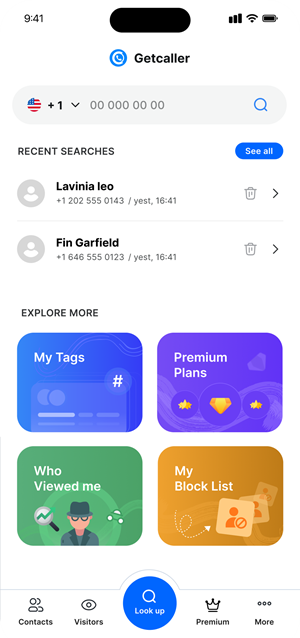
Accede a las funciones de Getcaller directamente desde tu navegador. Perfecto para búsquedas rápidas desde tu ordenador.
Tu cuenta, historial y configuración se sincronizan perfectamente entre la web y la aplicación móvil.
Disfruta de una interfaz amplia en tu escritorio o portátil para una investigación detallada de números.
Inicia sesión al instante escaneando un código QR desde la aplicación móvil Getcaller. Sin contraseñas.
Abre la versión web de Getcaller en cualquier navegador moderno en tu ordenador, tablet o teléfono.
Crea una cuenta o inicia sesión con código QR desde la aplicación móvil para acceso instantáneo.
Comienza a buscar números de teléfono, revisar tu historial de llamadas y gestionar tu perfil en línea.
Descarga la app de Getcaller para identificar llamantes desconocidos y gestionar llamadas no deseadas.
Abrir Versión Web¿Permite cookies de análisis para entender cómo se usa este sitio? Puede rechazarlas y seguir usando el sitio, o cambiar su elección aquí más adelante.
