الوصول إلى Getcaller من أي متصفح دون تحميل تطبيق. ابحث عن أرقام الهواتف، تحقق من تقارير السبام وأدر ملفك الشخصي لمعرّف المتصل عبر الإنترنت على web.getcaller.net.
فتح نسخة الويبابحث عن أرقام الهواتف مباشرة من متصفح الويب. لا حاجة لتثبيت تطبيق – يعمل على أي جهاز متصل بالإنترنت.
أدخل رقم هاتف لمراجعة السياق المتاح حول المتصل والوسوم التي يضيفها المجتمع عند توفر البيانات. لا تضمن النتائج هوية المتصل، والبحث عن الملفات الشخصية على وسائل التواصل الاجتماعي ليس ميزة مدعومة.
الوصول إلى سجل البحث الكامل عبر الإنترنت. راجع عمليات البحث السابقة والنتائج المحفوظة من أي جهاز.
أدر ملفك الشخصي على Getcaller، حدّث اسمك وتحكم في كيفية رؤية الآخرين لرقمك.
يتزامن حسابك بين الجوال والويب. عمليات البحث على الويب تظهر في سجل التطبيق والعكس صحيح.
اعرض وأدر الوسوم على رقمك. شاهد الأسماء التي حفظها الآخرون لك في جهات اتصالهم.
جرب واجهة نظيفة وبديهية مصممة لتحديد هوية المتصل بسرعة.
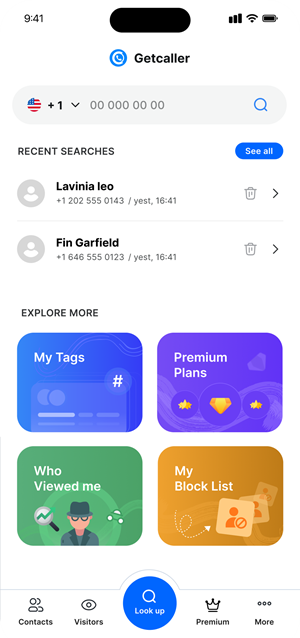
الوصول إلى ميزات Getcaller مباشرة من متصفحك. مثالي للبحث السريع من جهاز الكمبيوتر.
يتزامن حسابك وسجلك وإعداداتك بسلاسة بين الويب وتطبيق الجوال.
استمتع بواجهة واسعة على سطح المكتب أو الكمبيوتر المحمول للبحث التفصيلي عن الأرقام.
سجّل الدخول فوراً عن طريق مسح رمز QR من تطبيق Getcaller للجوال. لا حاجة لكلمات المرور.
افتح نسخة Getcaller الويب في أي متصفح حديث على جهاز الكمبيوتر أو الجهاز اللوحي أو الهاتف.
أنشئ حساباً أو سجّل الدخول برمز QR من تطبيق الجوال للوصول الفوري.
ابدأ البحث عن أرقام الهواتف ومراجعة سجل المكالمات وإدارة ملفك الشخصي عبر الإنترنت.
حمّل تطبيق Getcaller للمساعدة في التعرّف على المتصلين غير المعروفين وإدارة المكالمات غير المرغوب فيها.
فتح نسخة الويبهل تسمح بملفات تعريف الارتباط التحليلية لفهم كيفية استخدام الموقع؟ يمكنك الرفض ومواصلة استخدام الموقع أو تغيير اختيارك هنا لاحقًا.
