Getcaller offre une identification d'appels puissante sur les appareils Huawei et Honor. Identifiez les numéros inconnus et bloquez les appels spam avec une compatibilité totale EMUI et HarmonyOS.
Google PlayVoyez instantanément qui vous appelle grâce à l'identification en temps réel sur votre appareil Android. Plus de doutes sur les numéros inconnus.
Détectez et bloquez automatiquement les appels spam, les appels automatisés et le démarchage téléphonique avant qu'ils ne vous dérangent.
Recherchez un numéro de téléphone pour consulter le contexte disponible sur l'appelant, les signaux de spam signalés par la communauté et les signalements, lorsque des données existent. Les résultats varient selon le pays, le type de numéro et la disponibilité des données, et ne constituent pas une preuve garantie d'identité ou de localisation.
Identifiez les numéros inconnus des appels manqués et découvrez qui a tenté de vous joindre, même lorsque vous n'étiez pas disponible.
Consultez les informations de l'appelant sous forme de widget flottant sur votre écran lors des appels entrants sur Android.
Recevez des notifications instantanées quand quelqu'un recherche votre numéro ou ajoute un nouveau tag à votre profil.
Découvrez une interface propre et intuitive conçue pour une identification rapide des appelants.
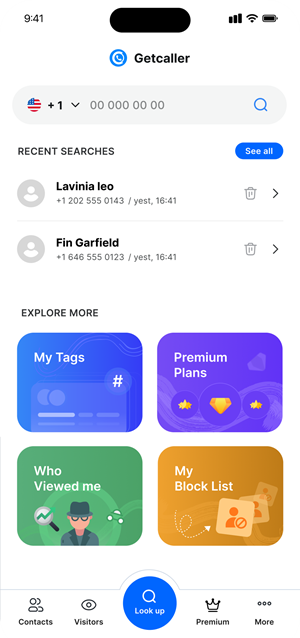
Recherche de numéros ultrarapide alimentée par notre moteur Android optimisé.
Détection de spam de pointe avec des signalements communautaires de millions d'utilisateurs.
Interface Material Design propre et intuitive qui s'intègre naturellement à chaque appareil Android.
Optimisé pour une consommation minimale de batterie. Fonctionne silencieusement en arrière-plan sans vider votre téléphone.
Installez Getcaller depuis le Google Play Store. La configuration prend moins d'une minute.
Autorisez les permissions d'identification d'appels pour que Getcaller puisse identifier automatiquement les appels entrants.
Getcaller identifie instantanément les appelants inconnus et bloque les appels spam sur votre Android.
Téléchargez l'application Getcaller pour identifier les appelants inconnus et gérer les appels indésirables.
Google PlayAutorisez-vous les cookies analytiques pour comprendre comment ce site est utilisé ? Vous pouvez refuser et continuer à utiliser le site, ou modifier votre choix ici plus tard.
